Security and Privacy
For you, and for your security team, DBA, data-protection officer or auditor: what Silver Bullet 3.0 keeps on your computer, what leaves it, and what it can and cannot do to your databases and files. Each statement here was checked against the program; where this release has a limit, it is said plainly.
In short
- Your data stays on your computer. Silver Bullet runs on your own
computer and answers only on
127.0.0.1: other computers cannot reach it. Databases are read where they are. Loaded files are kept in the data folder. Nothing is sent to Govirang Microspaces Private Limited. - The AI model never receives rows or query results. A cloud model receives your question and the names of your tables and columns (with their meanings and your rules): never your data. A value from your data is sent only when you typed it in the question yourself. A model on your own computer also sees a few example values, since nothing leaves the computer. Silver Bullet writes and runs the query itself.
- Personal data is never sent to the model, never sampled, and masked in everything worked out in advance (the brief, insights, board tiles and executive briefs).
- It only reads. A database account that can change data is refused; every query is checked before it runs, estimated, limited in time and rows, and run in a read-only session.
- Secrets are sealed (AES-256-GCM) with a key kept in the data folder.
- Every question and every request to an AI model is recorded, in a chained record you can check and export as a signed zip.
- Nothing phones home. No licence check over the network, no update check, no telemetry. Silver Bullet contacts the databases you add, the AI model you choose, and — only when you buy, renew or recover a licence from inside it — the licensing service (Buying a licence).
What Govirang Microspaces Private Limited itself receives, and only when
you buy or manage a licence, is in the Privacy Notice
(also in the program: About → Privacy Notice). The record that you
accepted it, the End User Licence Agreement and the Terms of Service (the
versions, the time, the user and the program version) is kept in
app.db, on your computer.
What stays on your computer
Everything Silver Bullet keeps is in its data folder:
| Data folder | |
|---|---|
| macOS | ~/Library/Application Support/SilverBullet3 |
| Windows | %LOCALAPPDATA%\SilverBullet3 |
| Linux | ~/.local/share/silver-bullet-3 |
| Data | Where it is kept |
|---|---|
| Data sources, the data dictionary, rules and measures, your corrections, verified answers, settings, the audit trail | <data>/app.db (SQLite) |
| Questions you asked, and each answer’s choices, SQL, headline and chart; the Activity & trust record | app.db |
| Saved answers, boards, and each board tile’s last figures (a table tile keeps at most 50 rows); the home brief; executive briefs | app.db, with personal data masked |
| Data-source passwords and cloud API keys | sealed, in app.db; the key is <data>/vault.key |
| Loaded files (the cleaned data) and rows set aside during loading | <data>/files/files.duckdb |
| The rows of recent answers (the temporary result area) | <data>/results/; see below |
| Logs | <data>/logs/ |
| Monthly zips of the Activity & trust record | <data>/activity-backups/ |
| Backups | <data>/backups/ |
| Licence state | <data>/licence/ |
Rows read from your databases are not copied into Silver Bullet, except briefly in the temporary result area and in board tiles as described above. The original file you upload is not kept after loading.
The data folder is created readable by your own account only. On macOS and
Linux every file Silver Bullet creates is its owner’s alone (umask 077),
and crash dumps are switched off, so memory (and any secret in it) is
never written to disk. The data in the folder (loaded files, app.db) is
not encrypted beyond the sealed secrets: protect your computer with
its own sign-in and, where required, full-disk encryption (FileVault,
BitLocker).
The temporary result area
So that re-grouping an answer, switching to the table, or picking “what
you meant” does not query the database again, each answer’s rows are kept
briefly in <data>/results/:
- a result not used for 60 minutes is deleted (
SB_RESULT_TTL_MINUTES); - above 512 MB in total (
SB_RESULT_MAX_MB) the least recently used results are deleted; - all of them are deleted when Silver Bullet stops, and anything left from a previous run is deleted when it starts.
The file is named from a hash of the session, never from the session token itself.
How you are signed in
There is no user name and no password. Silver Bullet listens on
127.0.0.1 only, and opens your browser with a one-time sign-in link: 32
random bytes, usable once, for two minutes, held in memory only. The link
is never on a command line, where other accounts on the computer could
read it: the browser opens a small page in the data folder that only your
account can read, which forwards to the link and is deleted a minute
later. A second start of Silver Bullet asks the running copy for a new
link by proving it knows a secret in running.json in the data folder,
which only your account can read; it never sends the secret, and opens
nothing unless the answer proves the secret too. So another account on
the same computer can neither ask for a link nor pose as Silver Bullet.
Browsers send a 127.0.0.1 cookie to every port of the computer, so on
the desktop the cookie is not enough on its own: each session is bound to
the browser tab that signed in, which sends a value of its own with every
request. The cookie ends when the browser closes, and every session ends
when Silver Bullet stops or starts. Only Silver Bullet’s own pages can
keep it running or tell it they have closed; another website cannot stop
it.
The session is a random token in the cookie sb3_session: HttpOnly
(scripts cannot read it) and SameSite=Strict. Only its SHA-256 is stored.
Every request that changes something must carry the header X-SB: 1,
which a page on another site cannot send. The pages carry a strict
Content-Security-Policy (they load nothing from anywhere but Silver Bullet
itself: fonts are built in, there is no CDN), no framing, no referrer and
no content sniffing.
Two-step sign-in (optional). From the user menu, Two-step sign-in → Turn on: scan the QR code with an authenticator app on your phone (Google Authenticator, Microsoft Authenticator or another), type the 6-digit code it shows, and keep the ten recovery codes it gives. From then on, opening Silver Bullet — by its link, from the icon or a second start — asks for the app’s code before anything else; someone else at your computer cannot open it without your phone. The codes are the standard RFC 6238 ones (a new code every 30 seconds; each works once; a phone up to 30 seconds out is accepted). The secret is kept sealed with the vault key, recovery codes only as hashes, and wrong codes count toward the same lockout as other failed sign-ins. Turning it off takes a code from the app or a recovery code. Turning it on, off, failed codes and recovery codes used are in the audit trail.
When the trial or licence has ended, the licence page can still be opened and a key entered; everything else answers SB3-6001 until a key is entered.
What goes to the AI model
The model reads the question and returns either the choices behind an answer (which measure, which grouping, which period, which filters) or, when the question does not fit those, an SQL query. Silver Bullet checks what comes back, writes or checks the SQL itself and runs it. The model never receives rows, query results or answers.
For every question
- the question;
- the data source’s name;
- for the tables relevant to the question: the table name and its chat name, an approximate row count, its meaning (from the dictionary or the database’s comment) and what one row is (“one row per order_id”, or for a file how often an id repeats);
- for each column shown in chat: its name, type, chat name, meaning or database comment, and other names;
- values of your data, cloud models: only a value you typed in the
question (“caterers” in your question sends
Caterer, so the model writes it exactly as the data has it; a plural counts). No other value of your data is sent; - values of your data, a model on your own computer: up to 15 example
values of short text columns (the values a column like Region or
Order status takes), so that “cancelled” is matched to
Cancelled. For a database these were read at the last connection test, only from columns the statistics say have at most 50 different values; for a file they are read inside Silver Bullet; - never a value of a column marked as personal data or named like one, for any model: the model is told only “personal data: values never shown to you”;
- the business measures (name, formula, table) and the rules from your data dictionary, as sentences;
- the dates in the question, already worked out (“last quarter” = …);
- verified readings of nearly the same questions on the same source (the question and its choices), never one that keeps rows by a value of a personal-data column (a column marked personal after it was verified): that verified answer still answers its own question, but is never shown to the model as an example.
If the model’s first reply is not usable, it is asked once more, with what was wrong. For a cloud model this names no value of your data other than the question’s own; a local model may be shown a column’s example values again.
When the question does not fit the choices
Silver Bullet asks the model for SQL instead:
- databases: the database product and its SQL rules, the relevant tables with their columns and meanings, example values (up to 25 per column, from the last connection test; for a cloud model only the values the question itself names), the business terms and the rules, and up to two queries you published for closely related questions (never one naming a personal-data column with a text value). If the database rejects the query for a reason other than safety, the failed SQL and up to 400 characters of the database’s error message are sent back once for a correction, with the data taken out. An error about the query itself (an unknown column or table, a syntax error) keeps its text, minus any quoted part or number the failed SQL does not itself contain. An error raised while the data was read (a value that could not be converted, a number out of range) keeps only its error code, with a fixed sentence: such messages can carry a value, with or without quotes. A safety refusal is never sent back to be “repaired”;
- files: the table names, file names, row counts, descriptions, every column’s name, type and description, and the values of text columns with 12 or fewer different values (for a cloud model, only those the question names; never of a column protected as personal data when the file was added), plus period columns’ labels (such as month names), the business terms, measures and rules.
Other calls to the model
- “Suggest, I will review” on the data dictionary drafts meanings for columns that have none. With a local model it sends the column names, types and up to 5 example values (each cut to 40 characters); with a cloud model, names and types only, no values. Personal-data columns are skipped entirely.
- Suggested questions for the home page (on unless switched off under
Admin → AI model): when a source’s data or description changes, the
model is sent the names of up to three of its tables with their row
counts, and for each column shown in chat its chat name, kind (text,
number, date) and what it is (money, status, place…) and its role. A
model on your own computer also gets the values of short text lists (12
values or fewer, each cut to 40 characters), never from a column
that is personal data or named like it, nor from a customer,
salesperson, product or order-number column; a cloud model gets no
value of your data. Personal-data columns are left out of the prompt
altogether. The questions the model returns that
the parser cannot read are then read as any typed question is (above).
Rows, results and figures are never sent: each suggestion is checked
against the data inside Silver Bullet. Only questions and their readings
are kept (
app.db). - “You often ask…” sends nothing anywhere: it is counted from Silver Bullet’s own record of your questions.
- Test connection on the AI model page sends “Reply with the single word OK.”
- Matching by meaning (the learning engine) turns questions into
numbers with the embedding model,
nomic-embed-text, in Ollama on your own computer by default, also when the answering model is in the cloud. When the AI model is Google Gemini, Gemini’s own embedding model is used (the questions already go to Google). Only if you name another cloud provider’s embedding model do questions go to that provider for this. - Executive briefs and insights ask no AI model: their words are written from the figures inside Silver Bullet.
Local or cloud
| Local model (Ollama, LM Studio) | Cloud model (OpenAI, Anthropic, Google Gemini, Azure OpenAI, Mistral) | |
|---|---|---|
| Where the description and the question go | to the model server you run | over HTTPS to the provider, for every question, under its terms and retention |
| Example values of non-personal columns | yes | yes (in questions; not in dictionary suggestions) |
| Rows, results, answers | never | never |
| Values of personal-data columns | never | never |
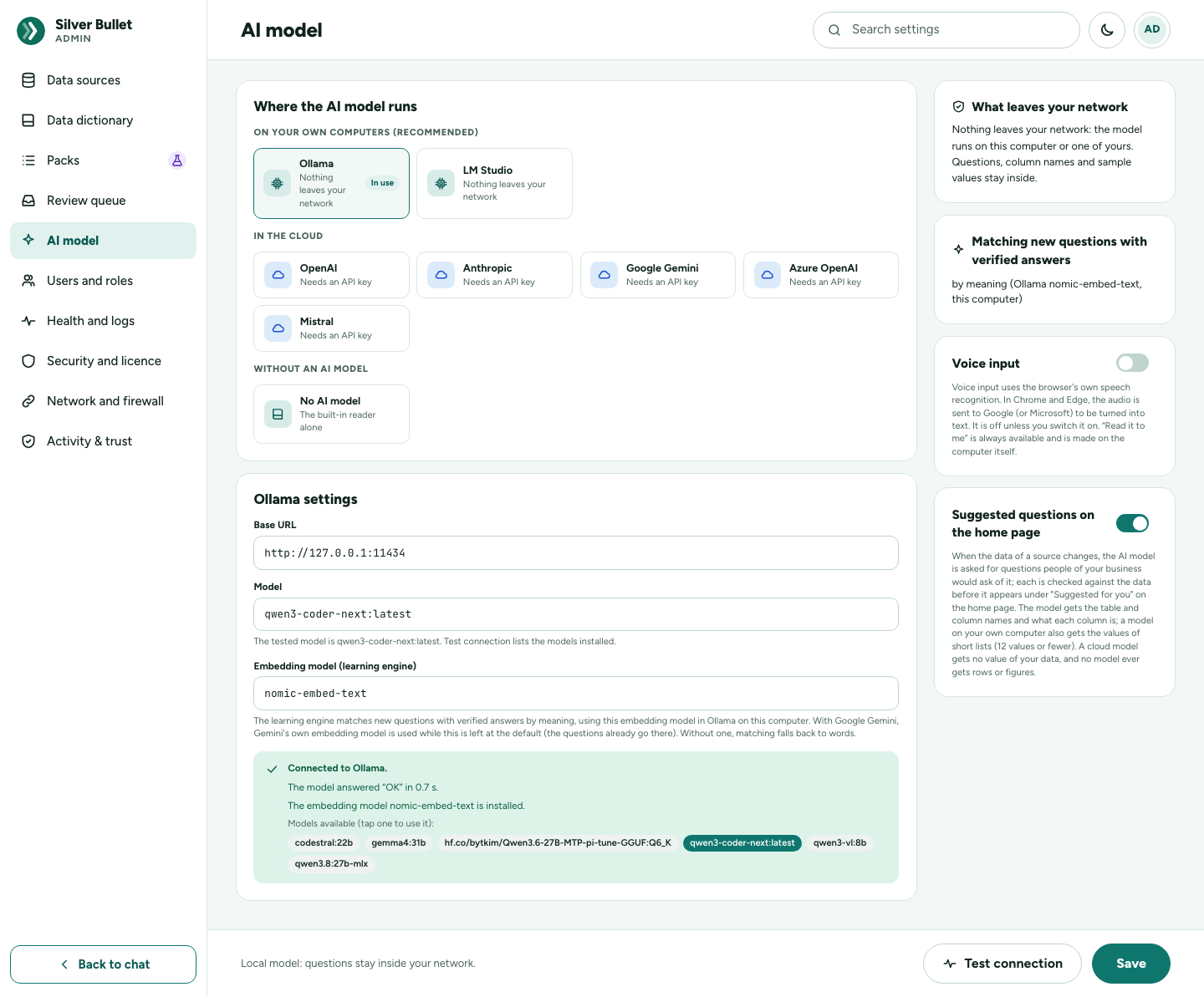
The default is a local model (Ollama). You choose on Admin → AI model;
that page shows what applies under What leaves your network. Cloud
providers other than Azure OpenAI are always called at their own fixed
address, so a key cannot be sent elsewhere by a mistyped setting. Only the
local model qwen3-coder-next was measured for this release.
Marking personal data later
A column marked as personal data in the data dictionary after its source
was added is protected as soon as the dictionary is published: its
values are left out of every prompt (the model’s reading of a question
and the fallback in which the model writes SQL: for a database, the
examples read at the last test; for a file, the list of a short text
column’s values) and masked in everything worked out from then on. A test
proves it (TestPersonalColumnsValuesNeverReachTheModel). A column you
chose to Keep as is, unprotected in the file wizard is ordinary data:
choose one of the protected options for anything personal.
Personal data
How it is found
- Files: when a file is added, every value is checked. A column is offered as personal data when most of its values are Aadhaar numbers (also checked with Aadhaar’s checksum), individual PANs, Indian mobile numbers or other phone numbers, or e-mail addresses; person-name columns are found by their header. The wizard asks what to do: Keep it, but never send its values to an AI model, Keep only the last 4 characters, Leave the column out, or Keep as is, unprotected. A kept, protected column is marked as personal data in the dictionary.
- By name, everywhere: a column whose name contains email, phone, mobile, aadhaar, pan_no, pan_number, passport, ssn, password, dob, birth, salary, address, fax, gstin, contact_name or contact person, bank_account or card_number, or has PAN as a word of its own, is treated as personal data even if nobody marked it. Other people’s names (an employee’s first and last name, a sales representative) are business data until you mark them. A false alarm costs example values and masks the column in the brief, board tiles and briefs.
- By hand: you mark any column Personal data (masked, never sent to an AI model) in the data dictionary.
What it means
- Never sent to the model, as above, over any path.
- Never sampled: asking a source for example values of a personal column is refused (SB3-3011).
- Masked in what is worked out in advance: the home brief, insights,
board tiles (and so a board’s PDF) and executive briefs (and so their
PDF, PowerPoint and Word files). These are worked out as a reader with
no right to personal data would see them, so a board or brief you send
on does not carry personal values. A personal column read as it is
shows its first and last character with dots between (
A••••••Z), and only when the value has six characters or more. A shorter value, and anything worked out from a personal column (part of it, a renamed or joined copy), is hidden whole (••••••): one character at a time would otherwise read the value. - Shown to you in your own answers. As the only person on this computer you are its administrator, so a question you ask, its table, its download and the rows set aside when a file was loaded show personal values in full. Think before you copy or download them.
- Masking cannot be got round with an alias. Where masking applies, if
the SQL that ran mentions a personal column at all, every output column
that is not plainly an ordinary column is masked, whoever wrote the SQL
(the model, or you as an expert query). Reaching a personal column
without naming it counts as mentioning it: a whole row as a value
(
row_to_json(c),c::text,to_json(c.*)), DuckDB’sCOLUMNS(…), SQL Server’sFOR JSON/FOR XML, a column list that renames (FROM customers AS c(a, b, city),FROM (…) x(city),WITH x(city) AS …, also afterCROSS APPLYand inside a join in brackets such asFROM (customers x(…) CROSS JOIN …)), a table alias declared inside such a join or after Postgres’customers * x, a table alias spelt like a clause word (customers AS pivot(…),customers apply: any word after a table that is not a reserved clause word counts as an alias, so a realPIVOT (…)orPARTITION (p0)over a table with personal columns is masked too),SELECT *orc.*over a table with personal columns (also afterTOP norDISTINCT ON (…)), a function of*such asJSON_OBJECT(*), DuckDB’sFROM twithoutSELECTand its#1column numbers, or a PostgresU&"…"identifier; and aUNION,INTERSECT,EXCEPTorMINUSthat mentions one is masked in every column (its columns are named by its first part). Functions that run a query written as text (query_to_xml,ts_stat,ts_rewrite, Oracle’sDBURITYPE) and Oracle’s XQuery (XMLQUERY,XMLTABLE,XMLEXISTS,EXTRACTVALUE,EXISTSNODE,CURSOR(…), and any text namingoradb:,ora:vieworfn:collection) are refused by the guard. So are, on Oracle, XSLT (XMLTRANSFORM, thetransformmethod, any text holdingxsl:or/oradb/) and every XML function except those that build XML from values (XMLAGG,XMLELEMENT,XMLFOREST,XMLATTRIBUTES,XMLSERIALIZE,XMLCONCAT,XMLCDATA,XMLCOMMENT,XMLCOLATTVAL); on PostgreSQL anyU&"…"name orU&'…'string (its escapes can spell a refused function), the whole*_to_xml*family,table_to_xmlschemaincluded, casts toregclass,regtypeand the other catalog-name types, andcurrent_setting,set_config,row_security_activeand thehas_…_privilegefunctions (their errors print the text they were given). - A failed query shows its data only to an administrator. For anyone
else, an error raised while the data was read keeps only its error code
(
SQLSTATE 22008,ORA-01722,Error 3548,(220)) and the sentence “a value in the data could not be used by this query (the value is not shown)”. An error about the query itself (an unknown column, a syntax error) keeps its text, minus every quoted or dotted name that is not a table or column of the database named in the query, and minus every number the query does not itself contain. When a name is taken out, the message lists the names in the query that the database does not have (for examplecontact_mail), so the query can still be fixed. A message whose database and code cannot be read is replaced by a fixed sentence. - A measure that fails says only that it fails. When a Power user’s
new measure does not work on a file’s data, they are told to check the
column names and types, never the database’s own message (it can quote
the values it tripped over). An administrator sees the full message. A
failed trial is recorded in the audit trail. In the same way, when a
question on a file fails while reading the data, anyone but an
administrator sees the kind of error (“Conversion Error”, “Invalid Input
Error”) and that a value could not be used, not the value; DuckDB’s
error()function is refused. - Typed personal values are flagged. If a question you type carries something that looks like a personal value to the model, Activity & trust flags it (see below).
The tests that prove it
| Test | Package | What it checks |
|---|---|---|
TestMaskingCannotBeBypassedByAliasing |
internal/live/answerkit |
aliases, expressions and unqualified names of personal columns are masked |
TestMaskingCannotBeBypassedWithoutNamingTheColumn |
internal/live/answerkit |
set operations, whole rows, column lists, U& identifiers, COLUMNS, FOR JSON |
TestVisibleSamplesWithholdPersonalColumns |
internal/live/answerkit |
example values of personal columns are withheld |
TestCloudModelIsSentOnlyTheQuestionsValues |
internal/answer |
a cloud model is sent only the values the question names; a local model keeps its examples |
TestCloudCorrectionNamesNoValues |
internal/answer |
the correction sent back to a cloud model names no value of the data |
TestSuggestPromptWithoutValues |
internal/answer |
home-page suggestions from a cloud model carry no value of the data |
TestKeepValues |
internal/files/ask |
the files’ question → SQL prompt keeps only the question’s values for a cloud model |
TestQuerySafetyWithoutADatabase |
internal/plugins/live |
sampling a column named or marked as personal is refused |
TestLoadAndQueryAKitFile |
internal/plugins/files |
sampling a file column once marked personal is refused |
TestFileWizardAndDictionaryOverHTTP |
internal/api |
dictionary suggestions skip personal-data columns |
TestMaskingCoversColumnListsAndWholeRowReads |
internal/live/answerkit |
FROM t AS c(…) column lists on every dialect, SELECT * / c.*, Oracle XQuery |
TestScrubDBErrorKeepsTheSQLAndDropsTheData, TestScrubDBErrorLiveEnginesKeepOnlyTheCode |
internal/app |
a database’s error message loses the values it quotes; an error raised while reading data keeps only its code on every engine |
TestMaskModesHideComputedValuesWhole |
internal/live/answerkit |
a value worked out from a personal column, or shorter than six characters, is hidden whole |
TestMeasureTrialMasksErrors |
internal/api |
a Power user’s failing measure shows no value of the data; an administrator’s shows the database’s text |
TestAskErrorsHideUnquotedValues |
internal/api |
a Power user’s failing question on a file shows no value, even where the database writes it without quotes |
TestFileColumnListMasked |
internal/api |
a column list over a loaded file is masked for a Power user |
TestExamplesNeverCarryPersonalValues |
internal/learn |
verified answers filtering a personal value are never examples for the model |
TestSecLLMPayloads |
internal/api (integration) |
every request to the model, over every path, carries no personal value, secret or answer figure |
TestSecMaskingMatrix, TestSecMaskingOnSharedPaths, TestSecMaskingBypassAllEngines |
internal/api (integration) |
personal columns across the paths (typed, chips, table view, board, brief, verified and expert answers) and the SQL bypasses on all five databases and files |
TestSecPromptInjection |
internal/api (integration) |
hostile names, comments and values given to the real model |
What Silver Bullet can do to your databases
Read, within limits; nothing else. Five independent layers, each of which would stop a write on its own:
- The account. Every connection test reads the account’s privileges from the database’s own catalog and refuses an account that can write (insert, update, delete, change structure, run procedures, administer). Questions are refused until a test has passed, and there is no way to switch this off. Create a read-only login on the data source’s page writes the script for your database; the scripts are also in the Installation Guide.
- The SQL check. Every query is read the way that database reads it
and refused unless it is one
SELECT(orWITH … SELECT) reading only the tables the last test found for this source. Refused, among others: a second statement; write words (INSERT, DROP, EXEC, INTO …); locking reads and hints (FOR UPDATE, UPDLOCK, NOLOCK …); functions that sleep, lock, read files or reach the network (pg_sleep, SLEEP, xp_cmdshell, DBMS_* …, quoted or not); table functions;TABLE nameused as a query; Oracle XQuery; database links, linked servers and other databases; parameters; system catalogs. A refusal is never sent back to the model to be “repaired”. - The session. PostgreSQL: a read-only transaction
(
default_transaction_read_only). MySQL and MariaDB: a read-only session and transaction. Oracle:SET TRANSACTION READ ONLY. SQL Server, which has no read-only transaction: the query is first compiled by SQL Server (SHOWPLAN, nothing runs) and refused unless SQL Server says it is exactly one SELECT, then run in a transaction that is rolled back. Lock waits are short. - Cost before running. The database’s own plan estimate is checked: by default a full scan of a table over 1,000,000 rows is refused.
- Limits while running. 30 seconds per query, at most 5,000 rows read back, at most 2 queries at once per source (each changeable per source).
What Silver Bullet can do to your files
Loading a file never changes the file you have. Questions about files are answered from Silver Bullet’s own copy, through two independent checks:
- One read-only statement: a single SELECT or WITH; none of INSERT, UPDATE, DELETE, DROP, ALTER, CREATE, TRUNCATE, ATTACH, DETACH, COPY, EXPORT, IMPORT, PRAGMA, SET, INSTALL, LOAD, CALL, GRANT, REVOKE, VACUUM, CHECKPOINT.
- Only this source’s tables, checked on the database engine’s own reading of the query: every table must be one of the source’s own loaded tables (or a named sub-query). It cannot read another source’s tables, Silver Bullet’s own tables, other files, or anything outside: functions that read files or the network, list tables, read settings or load extensions are refused.
The query then runs in a read-only transaction that is always rolled back, with the same time and row limits. The time limit holds even for a query the database engine cannot interrupt (one long calculation): the answer comes at the limit. At most six queries about files run at once, three of them one person’s; while three of one person’s are still finishing past their limit, that person’s further questions about files are refused as busy, and other people’s still run. A query past its limit gives its place up, so two people’s slow queries cannot hold up a third. Once eight queries are busy, the places left go to people who have none running, one each. The files database and the kept results of every signed-in session share one limit: half the processors and half the memory in all, however many people or sessions ask. So queries past their limit leave the rest of the computer free.
A workbook is a zip, and a few kilobytes can declare a sheet a million rows by 16,384 columns, unpack a thousandfold, or point a million cells at one long text; a Parquet file can do the same with one stored value. A file is refused with a message when it would make more cells than it has bytes (at least 4 million), when its contents or its values come to more than 16 times its size (at least 64 MB), when a workbook’s parts nest more than 64 levels deep, hold over a million elements or a tag longer than 1 MB, or when one cell is longer than Excel allows (32,767 characters). The small parts that list a workbook’s other parts are read within a few megabytes of memory. A whole number may have at most 4,300 digits, and long numbers are refused before they are converted. A Parquet file’s text is counted before it is read, with each special character counted as it will be written out, and the database engine reading it has a memory limit of its own. One Parquet value may be at most 1,048,576 characters when written out; a file with a longer one is refused with a message.
An upload may carry at most 32 fields besides its files, 256 KB in all. A field’s name may be at most 64 characters, and a file’s name at most 255. Fields the product does not use are not kept.
An upload is written to disk as it arrives, never held whole in memory.
Each person has one upload and one file check (reading a file to list its
sheets or check it) at a time, a second waiting for the first; at most
five file imports waiting; and an upload needs twice its size free on the
disk. While the file wizard is open the uploaded file waits in
<data>/imports/; it is deleted when the file is added, the wizard is
cancelled, or it is left unused for 24 hours.
Downloads and copies: a text cell that a spreadsheet would read as a
formula (one starting with =, +, -, @, a tab or a carriage return)
is written with a leading apostrophe in a downloaded CSV, a copied table
and the set-aside rows’ CSV, so it opens as text; the Excel download’s
text cells are never formulas.
Secrets
| Secret | Protection | Key |
|---|---|---|
| Data-source passwords and cloud API keys | AES-256-GCM, each value sealed separately and bound to where it is sent (the source’s server, database and sign-in; the model’s address): it does not open for anywhere else | <data>/vault.key, 32 random bytes, created on first start, readable by your account only (on macOS and Linux a key readable by others is refused) |
| Session tokens | SHA-256 hash (not reversible) | none |
- Secrets are write-only: an API key is shown only by a short preview (“Stored: …”); no page returns a stored password or key. Remove the stored key erases it.
- The log never contains passwords, session tokens, API keys or result rows. It does contain questions, SQL and source names: the evidence a DBA asks for. Every line, in the file and to a syslog collector, is cleaned as the support bundle is: anything that looks like a secret is removed (also a password in a database connection string), and personal values typed into a question (e-mail addresses, phone numbers in any country’s format, PAN, Aadhaar, US Social Security numbers, IBANs, card numbers) are masked (“p••••m”). In a question as written to the log, only plain words, short numbers and dates are kept. Any other word is replaced by “•••”: a word with letters and digits, a long number, an address. A value given after a word such as password, pass, PIN, key, token or SSN is removed, however the two are joined. The audit and Activity entries sent to a syslog collector are cleaned the same way. Database error messages are cleaned of the password before they are shown or logged. When an AI provider that uses an API key answers with an error, only the plain words of its reply are kept: any word with digits, and any long word, is replaced by “…”. So no spelling of the key reaches the error, Activity or the log. When a provider refuses the key, its reply is not kept at all.
- The support bundle (Admin → Health and logs → Download support bundle) holds the log files with passwords and keys removed, the last 30 days of the audit trail and the environment report. Look through it before you send it to anyone.
- Without
vault.key, the sealed secrets cannot be opened. Silver Bullet refuses to start when the key is missing but the database holds secrets, rather than silently making a new key.
Activity & trust: proof of what was sent
Activity & trust (in your account menu, or Admin → Activity & trust) records every question you ask and every request sent to an AI model, so the claims above can be checked, question by question, rather than taken on trust.
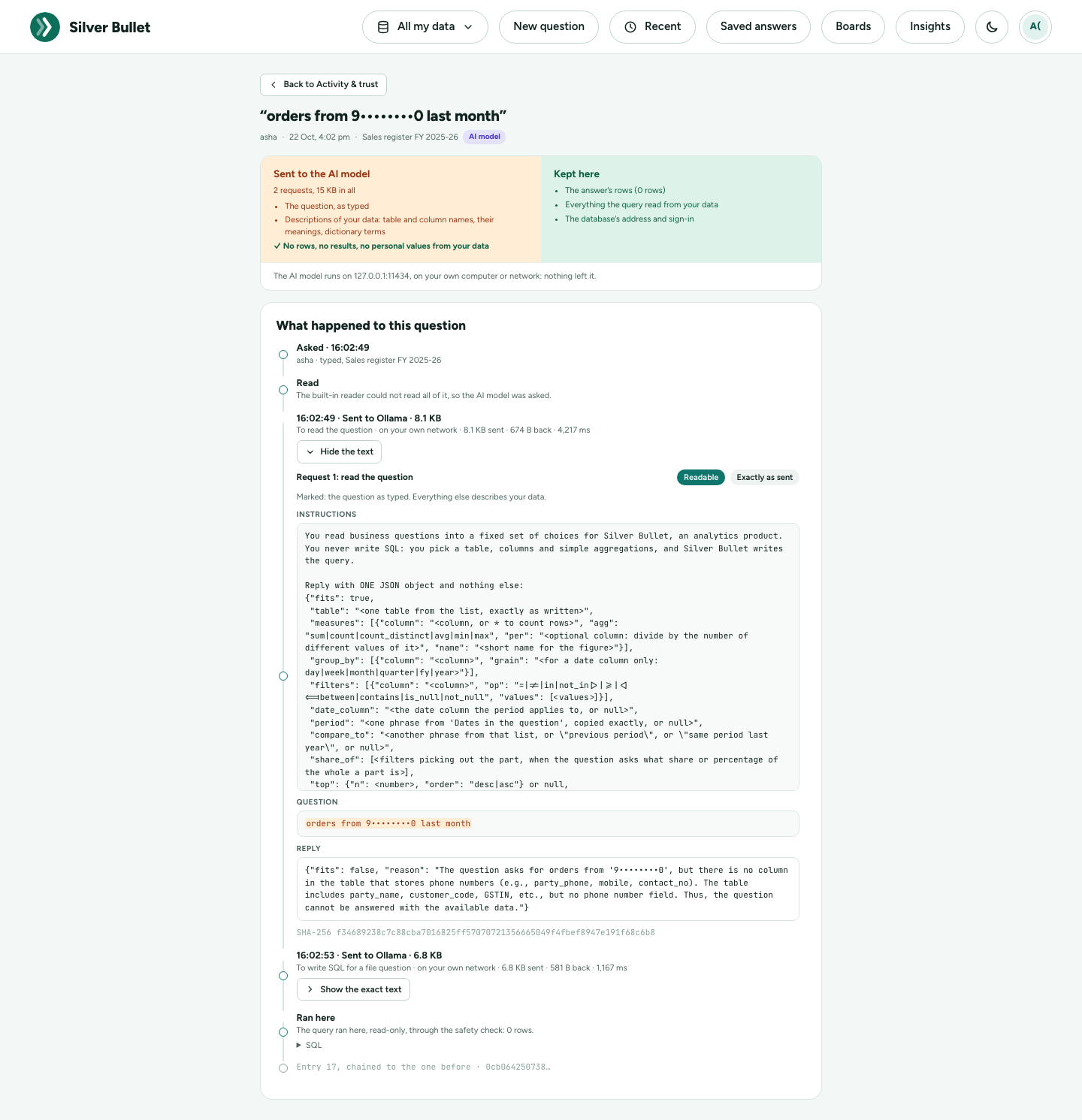
- Every question: when, about which data, how it was answered (a verified answer, the built-in reader, the AI model, not answered), how many rows, and its SQL. Never the rows themselves.
- Every request to an AI model, exactly as it was sent, recorded where it leaves the program, so no way of calling a model escapes it: reading a question, writing SQL, matching a question by meaning, suggested questions, the dictionary helper, the connection test. Each question’s page shows Sent to the AI model beside Kept here, the request’s text with the question marked, the model’s reply, and its SHA-256 fingerprint. A question answered without a model says Nothing sent. After answering, the text values of the result are looked for in every request the question sent, and the page says what was found: normally none; at most category names the model is shown as examples.
- On every answer a small lens says Nothing sent, or What was sent · 2.1 KB, no data, and opens that question’s trail.
- Overview: over 7 to 365 days, how many questions needed an AI model at all, what the requests carried, where they went (each address, how many requests, how much each way), and what needs a look. Download signed report is the zip of that period.
- Flags: a question that carried something looking like a personal value (an e-mail address, phone number, PAN, Aadhaar number, GSTIN or card number, as you typed it) to a model is flagged, and shown masked. Names are not detected. Reveal shows the question as typed, and is recorded in the audit trail.
- Tamper-evident: every entry carries a hash of the one before it; Records and backups recomputes the chain and says whether any entry was changed or removed outside the product.
- Kept a year (questions) and 90 days (the exact text of requests and
replies; after that their size and fingerprint stay), both adjustable
under Records and backups. A zip of each month is made on the 1st,
and one before anything is removed, in the data folder’s
activity-backups. - The zip (any period, for an auditor) holds the questions as a spreadsheet, every entry with its hash, the exact text still kept, and the flags masked; it is signed with this installation’s own key, and Check a zip confirms its signature, every file and its chain.
The audit trail
Besides the questions, Silver Bullet records what was changed and done:
data sources created, changed, tested and deleted, schedules, the
dictionary (drafts, publish, suggestions), rules and verified answers,
your corrections saved or dismissed, the AI model and API keys, settings,
boards (and their tiles, refreshes and PDF downloads), an answer copied or
downloaded (answer.export: the format, the source and the row count),
the set-aside rows downloaded, a column’s sample values read
(source.sample: which column, not the values), expert queries run, a
flagged value revealed, network checks, support bundles, and licence
activations (including failed ones). It never contains passwords, keys or
data rows; a database error recorded with an expert query loses any value
it quotes.
The audit trail is kept in app.db, and this release does not purge it
automatically. It has no page of its own in the app: the last 30 days of
it are in the support bundle.
Network
- Listening: on
127.0.0.1only (port 8930, or another free port if that one is busy). Other computers cannot reach Silver Bullet. - Outbound: to the databases you add and to the AI model you choose (Ollama or LM Studio where you run it, by default on your own computer; a cloud provider’s HTTPS address), and to the licensing service only when you use Buy, the renewal of a key bought online, Get my key or Move to this computer (below). No licence check over the network, no update check, no telemetry. A licence key is checked on the computer itself with a public key built into the program.
- Network and firewall (Admin) lists every address Silver Bullet
connects to: database hosts and ports and the AI model, never a login,
password or key. Check from here opens a connection to each of those
addresses only (an HTTPS
HEADto a service), sends nothing else, is limited to 30 an hour and is recorded in the audit trail. - Components (Admin) lists what the program is built from and the vulnerabilities known when it was built. Nothing on it goes to the internet: a security advisory is a file you load, checked against the release key built into the program.
- Database encryption is chosen per source (for example
sslmode=requireon PostgreSQL,encrypt=trueon SQL Server, TCPS on Oracle); see the Administration Guide. - No downloads of code: the files engine (DuckDB) never fetches or loads extensions. A full session was recorded at the network level: the only connections were to the configured databases and AI model, with no DNS lookups and no internet traffic of its own.
Buying a licence: what is sent
Buying is done in your browser, on Dodo Payments’ checkout
(checkout.dodopayments.com): Dodo is the merchant of record and takes
the payment, the tax and the invoice; Silver Bullet never sees your card.
There are no customer accounts. Silver Bullet itself talks to the
licensing service (HTTPS, port 443; its address is on Network and
firewall) only:
| When | What is sent |
|---|---|
| After Buy, until the key arrives (every 10 seconds for half an hour, then hourly, at most 30 days) — on by default, can be switched off | the claim made at Buy (128 random bits) and this computer’s code |
Once a day while a key bought online is installed, the first time soon after each start (whatever the saved time of the last check says), when such a key is entered (also with licence activate), when the key file holds another key than the one last checked, and every hour in the week after the licence moves to another computer — always (the switch only stops a newer key being installed); it is how a licence moved to another computer stops on the old one |
the key in use, which the service checks by its signatures |
| Get my key, Move to this computer — when you use them | the order number and e-mail address you type, and this computer’s code |
The computer’s code is a hash of the computer’s own id with the product’s
salt: the id itself never leaves the computer. Nothing about your data,
questions, databases or files is ever sent. Requests carry these in the
body, never in the address. The calls use the web proxy in HTTPS_PROXY
and the system’s certificates. With both switches off, or with no
connection at all, a key pasted from the e-mail works as always; the
checkout can be paid from a phone with the QR code.
What the licensing service keeps (Govirang Microspaces Private Limited is the controller; Cloudflare hosts it, Resend sends the e-mail): the order number, the computer’s code, the e-mail address Dodo collected (erased two years after the licence ends), the plan, and when each key was issued — never the key’s text, your name, address or card. A key bought online names your business (or your name) as given at checkout, never your e-mail. To have your e-mail erased, write to the licence address.
Voice
- Voice input (the microphone) is off by default. You can turn it on under Admin → AI model → Voice input; the change is recorded. It uses the browser’s own speech recognition: in Chrome and Edge the audio is sent to Google (or Microsoft) to be turned into text. Silver Bullet receives only the text.
- “Read it to me” is always available. The browser speaks the answer with its own voices on the computer; Silver Bullet sends nothing anywhere for it.
Backups contain data and keys
Silver Bullet backs itself up into backups/ in the data folder (every
24 hours by default, the newest 7 kept; see the
Administration Guide). The backups have
the data folder’s own permissions. A backup holds app.db and
vault.key (anyone with both can open the stored database passwords
and API keys) and files.duckdb, which holds all loaded data; so does any
copy of the data folder. Treat backups like the data and the passwords
they protect: restricted storage, never e-mail, delete copies you no
longer need.
How the packages are signed
Every package is signed by Govirang with its own release key, and by no
one else: not by Apple (the Mac app has an ad hoc signature only and is not
notarised), not by Microsoft, not by a certificate authority. So macOS
Gatekeeper and Windows SmartScreen warn on the first start. This is by
design and will not change (EULA clause 10A). Check every package against
the SHA-256 checksums and the release-key fingerprint published with the
release before installing (Installation Guide, Checking the packages);
SilverBullet version prints the fingerprint the program trusts.
What Silver Bullet does not do
- It does not accept connections from other computers.
- It does not write to your databases, call procedures, or copy tables out of them.
- It does not send rows, results or answers to any AI model, nor values of personal-data columns.
- It does not contact anyone but your databases, your chosen model and, only when you buy, renew or recover a licence, the licensing service: no telemetry, no update check, no licence check over the network.
- It does not keep the original uploaded files.
- It does not encrypt the data folder as a whole (only the stored secrets).
Reporting a security issue
Report a suspected security issue to Govirang Microspaces Private Limited directly, not in a public tracker, with the version (About Silver Bullet in your account menu).
Support: ______________________