Troubleshooting Guide
What can go wrong with Silver Bullet 3.0 on your computer, why, and what to do about it. The first sections go by symptom; the last lists every error code you can meet. When you need help, Reporting a problem at the end says what to send.
Where to look first
- The message on screen. Every error says in plain words what went wrong, and most add what to do. Under the message is a line such as SB3-3002 · Reference: …: the error code and the request id. Note both down: the code is the section of this guide, the reference finds the exact line in the log.
- Admin → Health and logs. It shows the version, the data and log folders, each data source’s status and last test. Its Logs page has The log: the newest lines of the log (errors, warnings or everything), with their error code and the reference you saw on screen. Switch between Errors, Warnings and Everything, and type the reference or the code in Search these lines to find its line. Refusals (a question refused, for example) are recorded as ordinary events, so they show under Everything.
- The log file,
<data folder>/logs/silverbullet.jsonl: one JSON line per event. Every line about one request carries itsrequest_id; a failed or refused request carrieserror_code(SB3-…). See The log below.
Starting Silver Bullet
Silver Bullet does not start
The reason is shown where you started it: a message box on Windows, an
alert on a Mac (when started from Silver Bullet 3.app), the terminal on
Linux. On Windows, a start that failed in a console window waits for
Enter so you can read the reason.
| The reason says | Cause | Fix |
|---|---|---|
data folder …: permission denied |
The data folder cannot be created or written by your account. | Check the folder’s permissions, or point SB_DATA_DIR at a folder you can write. |
log folder … |
The log folder cannot be created or written. | Correct SB_LOG_DIR, or remove it to use <data folder>/logs. |
the vault key is missing, but the database holds N secret(s) sealed with it … |
app.db was copied or restored without its vault.key. |
See The vault key is missing after a restore. |
vault key … is readable by other users (mode …); run: chmod 600 … |
vault.key has loose permissions (Linux, macOS). |
Run the chmod 600 command the message gives. |
the database is version N, newer than this program (M) … |
The data folder was used by a newer Silver Bullet. | Run that version or newer, or restore a backup taken with this version. |
settings: SB_… is not a whole number (or another settings: message) |
A setting in silverbullet.env or the environment has a value that is not allowed. |
Correct the setting it names. |
the licence key built into this program is damaged |
A damaged download. | Download the package again and compare its SHA-256 with the one on the Download page. |
Windows says “Windows protected your PC”
Silver Bullet is signed with Govirang’s own release key, not by Microsoft (EULA clause 10A), so Windows does not recognise it. Click More info, then Run anyway. Once is enough.
macOS says the app cannot be opened or checked
Silver Bullet 3.app is signed with Govirang’s own release key, not
notarised by Apple (EULA clause 10A). Double-click it
once and click Done on the warning, then open System Settings →
Privacy & Security, click Open Anyway next to Silver Bullet 3 and
confirm with your password or Touch ID. Once is enough. On macOS 15
Sequoia and later, right-click → Open no longer skips the warning:
Open Anyway is the way (on macOS 14 and earlier either works).
The menu-bar or tray icon is missing
- Mac: the icon is in the menu bar, top right; on a crowded menu bar it can be hidden behind the notch or other icons. The app has no Dock icon: Silver Bullet is used in the browser.
- Windows: it may be behind the ^ arrow at the end of the taskbar; drag it onto the taskbar to keep it visible.
- Linux: the desktop has no status-icon area (stock GNOME, some
minimal window managers). Silver Bullet then uses its terminal as the
window: start it from a terminal (
./SilverBullet), press Enter to open the browser again, Ctrl+C to stop. On GNOME, the AppIndicator and KStatusNotifierItem Support extension gives it an icon.
The icon’s menu has Open Silver Bullet, Show data folder, the version, and Quit Silver Bullet.
The browser did not open, or a page says to open Silver Bullet again
Silver Bullet signs you in with a one-time link that works once, for two
minutes (SB3-1013: That sign-in link was already used or has expired).
There is no password. Click Open Silver Bullet in the icon’s menu, or
start Silver Bullet again: a second start opens the browser on the running
copy, signed in. The same applies when a page says you are no longer
signed in (SB3-1001). On a computer that refuses to open the browser,
start it from a terminal with -no-browser: it prints the link to copy
into the browser within two minutes.
Port 8930 is busy
Nothing to do. Silver Bullet takes another free port and opens the browser there; started from a terminal it prints (port 8930 was busy, using N). Silver Bullet Suite 2 uses 8920, so both can run side by side.
A second copy will not start
There is one copy per data folder. Starting Silver Bullet while it runs
does not start a second copy: it opens the browser on the one that is
running (on a Mac, a second double-click does the same). To run two copies
on one computer, for testing, give the second its own data folder with
the environment variable SB_DATA_DIR.
Silver Bullet stopped by itself
By design. Silver Bullet stops about 90 seconds after the last Silver
Bullet page was closed, or after 10 minutes with no Silver Bullet page open
at all. Nothing is lost: start it again. A computer that slept is not
counted as idle. The log records stopping by itself: … with the reason.
To change it, set SB_DESKTOP_IDLE_MINUTES (minutes with no page open;
0 = never stop by itself) in silverbullet.env in the data folder, or as
an environment variable. Keep a Silver Bullet page open while a large file
is being added.
A setting change has no effect
Settings are read at start: quit Silver Bullet and start it again. The file
must be silverbullet.env in the data folder, and an environment variable
of the same name wins over it. Health and logs shows which settings
file was read. Silver Bullet always listens on 127.0.0.1 and chooses its
own port and data folder, so SB_LISTEN, SB_TLS_CERT, SB_TLS_KEY,
SB_TRUSTED_PROXIES and SB_DATA_DIR in that file have no effect.
Two-step sign-in: the code is refused, or the phone is lost
- The code is refused: type the code the app shows now (it changes every 30 seconds) and check the phone’s clock is set automatically. Each code works once.
- “This sign-in has expired”: the code page lasts five minutes and five tries; open Silver Bullet again from its icon.
- The phone is lost: choose Lost your phone? Use a recovery code and type one of the codes you kept (each works once). Then turn two-step sign-in off and on again with the new phone (user menu → Two-step sign-in).
- No phone and no recovery codes: quit Silver Bullet from its icon,
then in a terminal run, on a Mac,
"/Applications/Silver Bullet 3.app/Contents/MacOS/SilverBullet" reset-admin, or on Windows, in the folder Silver Bullet is in,SilverBullet.exe reset-admin. It turns two-step sign-in off and prints a one-time password: the next time Silver Bullet opens it asks you to replace it once (type the printed one as the current password). Turn two-step sign-in on again afterwards with your new phone.
Where Silver Bullet keeps your data
Show data folder in the icon’s menu opens it. Normally
~/Library/Application Support/SilverBullet3 (Mac),
%LOCALAPPDATA%\SilverBullet3 (Windows), ~/.local/share/silver-bullet-3
(Linux). Silver Bullet Suite 2’s folder is never touched.
Adding a database
Test connection runs five checks in order. When the server cannot be reached or the sign-in fails, the checks after it say Not checked: fix the step above first. A failed check shows the database’s own message (never the password) and what to check. A source whose test did not pass can be saved, but you cannot ask about it until it passes.
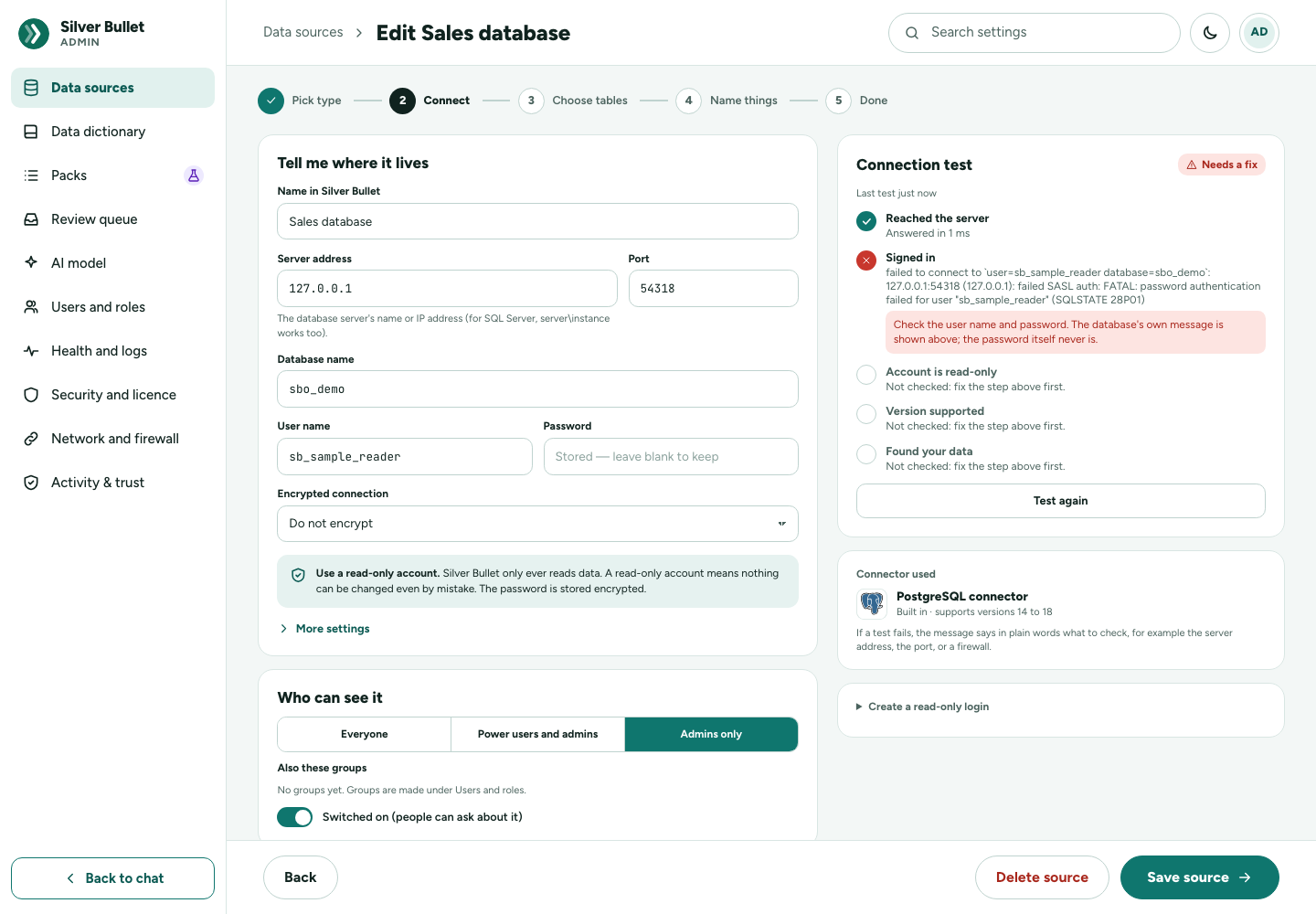
| Check | Fails because | What to do (or tell whoever manages the database) |
|---|---|---|
| Reached the server | The address or port is wrong, the database is not running, or a firewall blocks the way. | Check Server address and Port (for Oracle, the connect string), and that you are on the office network or the VPN. Admin → Network and firewall → Check from here says why the connection fails. Tell whoever manages the database or the network: “my computer, at its address, must reach host:port.” |
| Signed in | Wrong user name or password; the database name is wrong; for Oracle, the listener does not know the service name or SID (ORA-12514, ORA-12505); the database refuses your computer’s address. | Read the database’s message shown under the check. Confirm the login, the password, the database (or service) name, and that the database accepts sign-ins from your computer. |
| Account is read-only | The account can change data (the check names the privileges), or it cannot read its own privileges. | Use a read-only account: only SELECT on the tables you want to ask about (the Installation Guide has a script for each database), or remove the named privileges. Then Test again. See below. |
| Version supported | The server’s version is outside the tested list (a warning for versions expected to work, a failure for unsupported ones). A MySQL card pointed at MariaDB, or the other way round, gives a warning only. | The check lists the supported versions. A warning does not stop questions. |
| Found your data | The account can read no tables in its default schema or the schemas named; the tables chosen in Choose tables are no longer there; or the table list cannot be read. | Grant SELECT on the tables, or name the schemas under More settings → Schemas to use; choose the tables again. |
What each database needs, in one line:
- PostgreSQL: a login role with CONNECT on the database, USAGE on the schemas and SELECT on their tables, nothing else; ideally on a hot standby.
- MySQL, MariaDB: a login with SELECT (and SHOW VIEW if there are views) on the schemas to expose, nothing else. On MariaDB 10.11 and later, nothing that writes granted TO PUBLIC.
- SQL Server: a login (SQL, Windows or Microsoft Entra) and a database user with SELECT on the schemas and SHOWPLAN, nothing else.
- Oracle: a user in the pluggable database with CREATE SESSION and READ (or SELECT) on the tables to expose, nothing else, and the PDB’s service name.
Not tested in this release: Kerberos and Microsoft Entra ID sign-ins to SQL Server, and Oracle 19c on a real server. If you use them, test them first and report what you find.
“The account can change data; Silver Bullet needs a read-only account.” (SB3-3003)
Silver Bullet only ever reads; every query is also checked and run read-only, but a read-only account means nothing can change even by mistake. The test names the privileges that make the account able to write. Get a read-only account and test again. If a source that used to work starts failing this check, someone granted the account a write privilege: Silver Bullet tests every switched-on database again five minutes after it starts and then once a day, and stops answering from it until the account is read-only again.
There is no setting to allow such an account. Create a read-only login on the data source’s page writes the script for your database.
Other messages when adding or using a database
| Message | Fix |
|---|---|
| A data source is missing, or SB3-3001 | The source was removed. Pick another in the data picker. |
| The data source is switched off. (SB3-3006) | Switch it on again under Admin → Data sources → Edit. |
| The data source could not be reached or refused the sign-in. (SB3-3002) | As for the first two checks above. |
| The data source has not been tested yet, so its tables are unknown. (SB3-3004) | Test connection on the source (Admin → Data sources → Edit). Test again after changing the address, the account or the tables. |
| The data source’s settings are incomplete or invalid. (SB3-3005) | The message names the field. |
| A data source with that name already exists. Choose another name. (SB3-3007) | Names ignore case. |
| The cost check is unavailable on this connection; the time limit still applies. (a note on the test) | The account cannot ask the database for a query plan (on SQL Server, SHOWPLAN is missing). Questions still run, under the time limit. Grant it to the login (or ask whoever manages the database to). |
Loading files
Files are added in four steps (Choose files, Check data, Review, Add) from the Files card under Admin → Data sources. Your original file is never changed.
| Symptom | Cause | Fix |
|---|---|---|
| The file is refused as too large (SB3-3010) | The limit is 200 MB unless you changed it (SB_MAX_UPLOAD_BYTES); Health and logs → Largest upload shows the current limit. |
Split the file, or save it as Parquet, which is much smaller. |
| The file could not be read. (SB3-3009) | An unknown format, a damaged workbook, a password-protected file, or a file renamed from another format. The message says which. | Open it in Excel and save it again as .xlsx or CSV, then try once more. |
| Letters look wrong in First rows, as I understood them (é, �) | The file’s encoding was read wrongly. Silver Bullet recognises UTF-8 and the usual regional encodings (an Italian price list saved by Excel as Windows-1252 reads correctly), but a guess can be wrong. | Save the file as CSV UTF-8 and add it again. |
| Everything is in one column | The separator between fields was not found. | Save it with commas, or as tab-separated text. |
| Add to Silver Bullet says Decide the open items first. (SB3-3013) | Something under Needs you has no decision. | Open each with Decide, or press Use recommended for all, then add. |
| The new file’s columns differ from the data already loaded. (SB3-3014) | Add new rows needs the same columns (names and types) as the file loaded before. | Choose Replace data instead, or correct the file’s columns. |
| This file import has ended: it was added, cancelled, or left unused for a day. (SB3-3012) | An import is kept for a day after it was last used. | Upload the file again. |
| A file source shows Failing with The loaded data is missing | The loaded copy in the data folder is gone (a partial restore). | Replace file to load it again. |
| Fewer rows than the file has | Rows were set aside (a total row, a note under the data, dates or values that could not be read the way you chose). | Review lists every change, with Undo; after adding, Rows set aside (CSV) downloads them with their reasons. |
A half-finished import is offered again when you return: A file import is waiting. Choose Continue or Discard.
Questions and answers
The answer is wrong
- Read the chips under How I read your question. Tap to change.: the period, the measure and how it is added up, the split, the filters. A wrong one is usually the cause: tap it and pick the right one. The answer is worked out again without asking the AI model.
- Press No, fix it. Say what looks wrong, then pick what you meant from alternatives worked out with your real numbers, or keep a note. The corrected answer is in use for you at once.
- Check it under Admin → Your corrections: run the safety check and make it a verified answer, or add a rule or a word in the Data dictionary. Clear meanings in the data dictionary are the biggest help to getting answers right.
If answers are wrong on every source, check which AI model is in use (Admin → AI model): this release’s measured accuracy is for the local model qwen3-coder-next only.
“This data cannot answer that question.”
The data has nothing that holds what was asked (for example a freight cost in data with no freight column). Ask about what the data holds, or try the cards on the home page. An answer saying No data for … means the question was understood but no rows matched: it often says The latest … is …, so ask about a period the data covers. Nothing in … matched means a filter value was not found; check its spelling.
“The question asks to change data; Silver Bullet only reads it.” (SB3-2009)
A question such as “delete the cancelled orders” or “increase the price by 5%” is refused before any AI model or data source is asked, and the refusal is recorded. Ask what you want to know instead: “how many orders were cancelled?”, “net sales excluding cancelled orders”.
“The query was refused by the safety check.” (SB3-2001)
The query would have done something not allowed: a change, a lock, a system routine, or a table that is not part of the data source. Nothing reached the data source. Ask in other words. If the table should be askable, add it under Choose tables for the source.
Too costly, too slow, or busy
| Message | Fix |
|---|---|
| The query would read too much of the database; narrow the question. (SB3-2002) | Add a period, a region or a product. The limit is the source’s Refuse a full scan of a table larger than setting (1,000,000 rows unless changed). |
| The query ran past the time allowed and was stopped. (SB3-2003) | Narrow the question. Each source has Time limit per query (seconds), 30 by default. For heavy use, point the source at a read replica. |
| The data source is already running as many queries as allowed. (SB3-2005) | At most two queries run at once per source. Wait a moment and press Try again. |
| The data source could not run the query. (SB3-2004) | The database’s own message follows. Ask in other words; if it keeps happening, report it with the reference. |
| The model did not produce a query. (SB3-2007) | Ask in other words, more concretely; or check the AI model page. |
| The choices name something this data source does not have. (SB3-2010) | A chip, a built question or a saved answer names a column the source no longer has. Pick again from the lists offered; if a column was renamed in the database, test the source again. |
“This answer’s result is no longer kept; ask again.” (SB3-2008)
Each answer’s rows are kept for 60 minutes after they were last used
(SB_RESULT_TTL_MINUTES), so that changing a chip or switching to the
table is instant. After that, ask again: the data source is read afresh.
Answers are slow
Most of the time is the AI model. With the local model a typed question takes about 15–30 seconds; tapped cards, chips, Build it and shortcuts that the product reads itself are much quicker, and changing a chip should take under 2 seconds. Under How I got this the answer shows how long it took (From … · N ms). Slower than that:
- the computer running the model has no suitable graphics card, or too little memory, or the model is loading for the first time after a start;
- a data source is slow or busy: a query waiting for a free slot, or reading a large table. Narrow the question or use a read replica.
The AI model
| Message | Cause | Fix |
|---|---|---|
| The AI model could not be reached. (SB3-4001) | Local: Ollama is not running, the address is wrong, or the model is not installed. Cloud: the network, the key, a web proxy, or the provider; the provider’s own message follows. | Local: check ollama list on the model’s computer and Address (http://127.0.0.1:11434 by default); install the model. Then Test connection on Admin → AI model: it says The model answered “…” in N s and lists the models installed. |
| The AI model settings are incomplete or invalid. (SB3-4002) | A field is empty or wrong. | The message names the field. |
| This provider needs an API key. (SB3-4003) | A cloud provider without a key. | Enter the key on the AI model page; it is sealed and never shown again. |
| No AI model is used here; this question needs one. (SB3-4004) | No AI model is chosen, and the built-in reader could not read this question. | Tap a card on the home page or one of the questions offered with the note, or say it like them: a measure, a grouping and a period (“net sales by region last quarter”). To have every question answered, choose a model on Admin → AI model. |
| The embedding model … is not installed: questions are matched by words until it is | The learning engine’s embedding model is missing. | ollama pull nomic-embed-text (or the model named). Matching verified answers by words works meanwhile, less well. |
Cloud models are not tested in this release; only the local model qwen3-coder-next was measured. A cloud model receives the question and descriptions of your data, never rows or results, and never values of a column marked as personal data (the AI model page says so under What leaves your network).
The brief and boards are not refreshing
The brief on the home page and the board tiles are worked out in advance, so opening them never queries a database. They are worked out again:
- for a database, on its schedule, set under Admin → Health and logs → Brief and boards refresh: Every day at a time (06:00 by default, your computer’s time), Every hour, or Not refreshed;
- for a file, when the file is replaced or rows are added;
- at once when the data dictionary is published or a rule is approved.
| Symptom | Cause | Fix |
|---|---|---|
| Your brief appears here once your data has been read | The source has not been worked out yet. | Wait a few minutes after its first successful test. |
| The brief is old | Silver Bullet was not running at the scheduled time; or the source’s schedule is Not refreshed; or the source is not Healthy (a failing source is not refreshed). | A missed refresh runs within a minute or two of Silver Bullet starting again. Set a schedule; fix the source’s connection test. Refresh now beside Your brief on the home page works it out at once. |
| A home card says No cards for this data yet: it needs a figure to add up | No column is set as something to add up, or as something to group by. | In the Data dictionary, set Used in questions as for the figures, groupings and the date, and Publish. |
| The brief picks the wrong figure | Without a main figure it guesses one. | For a database, the Name things step of the source marks the main figure, grouping and date; also describe the columns in the data dictionary and publish. |
| A tile says The last refresh failed; these are the last figures. | The query failed; the message follows. | Fix the cause (usually the source’s connection), then Refresh now. |
Studio
| Symptom | Cause | Fix |
|---|---|---|
| There is no Studio at the top | Studio is for people who make boards: a Power user or an administrator. On the desktop edition you are the administrator, so it always shows. | On the server edition, an administrator makes you a Power user (Admin → Users). |
| This data does not have enough to make a starter. Start empty and add tiles. | No column is set as a figure to add up, or nothing to group by. | In the Data dictionary, set Used in questions as for the figures, groupings and the date, and Publish. Then open Studio again. |
| The preview says This cannot be worked out: … | The choices do not fit the data, for example a period the data does not reach. | Change the words on the left; the message names what is wrong. Nothing is saved until Add to board. |
| A tile says Not filtered by …: this tile’s data does not have them. | The board’s filter names a column this tile’s table does not have. | Expected: the filter applies only where it can. Use a filter every tile’s data has, or leave that tile as it is. |
| The Design check score went down after an edit | The edit breaks one of the 15 dashboard rules, for example a fifth chart, or two periods on one board. | Open Design check: each broken rule names its tiles and offers a fix; Fix all applies every fix. A check is advice, not a block. |
| A board will not download as PowerPoint, Word or PDF: too many of these in the last hour; try again later (SB3-1016) | Board files share a limit of 60 an hour per person, because each one works out every tile. | Try again later in the hour. |
Licence
Silver Bullet runs a 14-day trial from the first start, then needs a
licence key (SBS2-… bought from inside the app, or SBS1-…) for this
computer. Nothing is contacted over the network to check it. One licence
includes every data-source plugin. The
Installation Guide says how to buy
one. Licence and payment questions: by e-mail to the address on the
Licence page (no telephone).
| Symptom | Fix |
|---|---|
| Every page shows Licence needed (SB3-6001) | The trial or the licence has ended. Your data is kept. Enter a key on that page or under Admin → Licence → Enter a licence key, or from a terminal: SilverBullet licence activate <key> (a running Silver Bullet sees it within a minute). |
| That licence key does not work here. (SB3-6002) | Paste the whole key. A key is issued for one computer: its code is shown as This computer’s code: … (with Copy code) on Admin → Licence and by SilverBullet licence status. For a licence bought for another computer use Move to this computer. Reinstalling Silver Bullet keeps the code; reinstalling the system gives a new one. |
| Paid, but the key has not arrived | Wait a minute on Admin → Licence (Waiting for your payment…), or press Check now. It is also in the e-mail from the licensing service (look in spam) and was shown on the thank-you page. If the fetch was switched off or the page was closed: Get my key with the order number and the e-mail you paid with. Your key is on its way means it arrives within a day by itself. Still nothing: e-mail your proof of payment to the licence address; once the payment is verified the key is sent by e-mail. |
| We are checking your order | The price of one region (India, Europe, UK, Singapore or Australia) was paid with a billing address outside it, or the payment did not match its product. Nothing to do: the order is checked within a working day and the key then arrives by itself (or the payment is refunded). Next time choose Price for the region you pay from. |
| Your last payment did not go through (banner) | The monthly subscription’s card was declined. Press Update payment method (Dodo’s page) and change the card. The licence keeps working to the end of the month plus at least 7 days, and the next month’s key arrives by itself once Dodo charges again. |
| New computer, or the system reinstalled (this licence key is for computer …) | On the new computer: Admin → Licence → Move to this computer, the order number and e-mail; open the link e-mailed to the order’s address within 30 minutes and press Confirm. The key arrives by itself. Limit: monthly once every 30 days, yearly twice a year (SB3-6009 beyond; e-mail us). |
| Buy a licence says buying from inside the app is coming soon (SB3-6006) | E-mail the address it gives, with this computer’s code (Copy code), for a key; paste the key when it comes. |
| The licensing service could not be reached (SB3-6007) | Buying, Get my key, moves and the monthly key need HTTPS to the licensing service (its address is on Network and firewall). Check the connection or the web proxy (HTTPS_PROXY). Paying works from a phone with the QR code, and the e-mailed key can always be pasted. |
| We could not find a paid order for this computer with those details (SB3-6008) | Type the order number from the key’s e-mail or receipt and the exact e-mail used to pay. Get my key works only on the computer the order is for; for another, use Move to this computer. |
| This computer’s clock says …, but Silver Bullet has already run on … | The clock was set back. Set the correct date and time; Silver Bullet continues. |
| The trial record of this installation was changed by hand, so the trial has ended. | Enter a licence key. |
| A record of this computer’s trial was removed or changed, so the trial has ended. | The trial is recorded in three places. One of them was deleted during the trial. Enter a licence key. |
| The 14-day trial is used up: Silver Bullet has run for 14 days …, though this computer’s clock says … | The clock was held back while the trial ran. Enter a licence key. |
| This licence was moved to another computer … | The licence was moved with Move to this computer; this computer’s key stopped 7 days after the move. Use it on the new computer, or buy a licence for this one. Deleting files in the licence folder, or copying the key back from a backup, does not bring it back. |
| … could not read this computer’s own id … (SB3-6011) | The trial and the licence are tied to the computer’s own id. Silver Bullet could not read it, so nothing can be used until it can. Restart Silver Bullet. On a Mac, do not start it under sandbox-exec, with a low process limit (ulimit -u), or with DYLD_INSERT_LIBRARIES set. On Linux, run it as a normal program, not inside unshare, a sandbox, or a container you made as an ordinary user; check that /etc/machine-id exists. Your data is kept. If it stays, e-mail support with the output of SilverBullet licence status. |
The trial counts from the first start on your computer account, even with a new data folder.
The vault key is missing after a restore
vault.key in the data folder seals the data-source passwords and API keys
stored in app.db. The two belong together.
- Silver Bullet will not start: the vault key is missing, but the
database holds N secret(s) sealed with it …. Put back the
vault.keyfrom the same backup or copy asapp.db. Only if it is lost for good: start once with the environment variableSB_ALLOW_NEW_VAULT_KEY=1, then enter every data-source password and API key again. - It starts, but sources fail with Stored secrets cannot be decrypted
with this vault key. (SB3-5003): the
vault.keypresent is not the one the passwords were sealed with. Restore the matching key, or enter each password and key again.
Silver Bullet backs itself up every 24 hours into backups/ in the data
folder (Admin → Health and logs → Backups). To go back to a backup:
quit Silver Bullet, run SilverBullet restore <backup folder>, and start
it again (Installation Guide, Backups and restore). It puts back app.db
and vault.key together, so the passwords open.
| Problem | Fix |
|---|---|
| Health and logs → Backups says The last backup failed …: no space left on device (or SB3-5005 after Back up now) | The disk of the data folder is full. Make room (copy old backups elsewhere and delete them, or keep fewer with a lower SB_BACKUP_KEEP), then Back up now. |
Silver Bullet is running on this data folder: stop it first from SilverBullet restore |
Quit Silver Bullet from its icon, then run it again. |
… is not a Silver Bullet backup from SilverBullet restore |
Name a backup folder (silverbullet3-backup-…, holding app.db and manifest.json), not the backups folder itself or a single file. |
| After a restore, something done since the backup is missing | That is what a restore does. What the data folder held just before is in backups/before-restore-<time>: quit Silver Bullet and restore that folder the same way to go back. |
Other messages
| Message | Fix |
|---|---|
| Silver Bullet is not answering. Check that it is running, then reload this page. | It stopped (perhaps by itself). Start it again, then reload the page. |
| The request was not understood. (SB3-5002) | Usually a page left open across an upgrade: reload it. |
| No such page or item. (SB3-5004) | An old link, or the item was deleted. |
| An unexpected error; the log has the details. (SB3-5001) | Find the reference in the log and send both to support (below). |
| This review item has already been decided. (SB3-2012) | The correction was already made a verified answer or dismissed; the Done list says when. |
| Other answers would change when saving a fix (SB3-2011) | The safety check found answers besides the one being fixed that would change. Check the list; save with Accept these changes and save only if every change is right, otherwise choose a narrower fix. |
The log, the support bundle and the environment report
The log
| File | What | Where |
|---|---|---|
silverbullet.jsonl |
Everything Silver Bullet logs | <data folder>/logs/ (or SB_LOG_DIR) |
silverbullet.jsonl.1 … .5 |
Older copies: a new file starts past 10 MB, five old ones are kept | same folder |
One JSON object per line, with time, level (INFO, WARN, ERROR),
msg, and, for a request, request_id, and error_code when it failed
(request failed) or was refused (request refused). Useful searches:
grep '"request_id":"<the reference>"' silverbullet.jsonl*   # everything about one request
grep '"error_code":"SB3-2003"' silverbullet.jsonl*          # one error code
grep '"level":"ERROR"' silverbullet.jsonl                   # failures
Never in the log: passwords, session tokens, API keys, licence keys, and the rows of your data or of answers. Questions and the SQL written for them are logged on purpose: they are what support and whoever manages the database need.
The support bundle
Admin → Health and logs → Support bundle. Type a Case reference
(optional) first (letters, digits, - and _), then Download support
bundle. One .tar.gz file, named silverbullet_<case>_<date>_<time>.tar.gz
(or silverbullet_logs_<date>_<time>.tar.gz without a case reference, in
UTC), containing:
manifest.json: when it was made, the case reference, the version and edition, and the environment report;logs/: the log files, with anything that looks like a password, key or token removed once more;audit_log.csv: the record of changes of the last 30 days (the newest 500 entries);MANIFEST.txt: a short summary.
Making a bundle is recorded. A bundle holds questions, SQL, source names and column names, never rows of data, passwords or keys. Look through it before sending if your policy requires.
The environment report
Admin → Health and logs → Download environment report: a text file
(silver-bullet-environment-<date>.txt) with the version, the data and log
folders, the operating system, the licence state and installation id, the
AI model in use, each data source’s kind, status, version and test
results, and disk use. Never passwords, keys, database hosts or logins.
The version
SilverBullet version prints, for example,
Silver Bullet 3.0.0-rc.15 (licensed build: 14-day trial, then a licence key).
It is also on Health and logs and in the icon’s menu.
If Silver Bullet will not start
The pages are not available then. Send instead: the whole
<data folder>/logs/ folder (zipped), the output of SilverBullet version,
and the reason shown when it failed to start (a screenshot of the message
box or alert, or the terminal’s text).
Reporting a problem
Help with the product is community support: these guides and the community forum. Licence and payment questions go by e-mail to silverbullet-license-support@govirang.com (there is no telephone support).
- Write down what happened: what you did, what you expected, what you saw, and the time with the time zone.
- Copy the reference (Reference: …) from the screen, and the error code if you found it in the log or on Health and logs.
- Take a screenshot of the whole browser window, with the address bar.
- Download a support bundle with a case reference (above). If Silver
Bullet will not start, zip
<data folder>/logs/. - Add: the version, the operating system, the AI model (provider and model name); for a wrong answer, the question, the answer, the query (How I got this → Show the query) and the right answer with where it comes from; for a file that loaded wrongly, the file or a copy with the same columns and made-up values, if your policy allows.
- Send it, with the case reference in the subject.
Do not send vault.key, app.db or the data folder unless support asks and
your policy allows: they hold your data and the key to its stored
passwords.
Every error code
Every error you can see has a code SB3-xxxx. One code means one cause,
and a code is never reused. The first digit says where to look: 1 signing
in; 2 questions and answers; 3 data sources and files; 4 the AI model; 5
the product itself; 6 the licence. The screen shows the message with its
code and reference. Below is every code Silver Bullet can show on your
computer, with its meaning and what to do.
SB3-1001
Not signed in, or the session has expired. Sessions last 12 hours by
default (SB_SESSION_HOURS). Sign in again. On the desktop edition, open
Silver Bullet again from the menu-bar or tray icon. If it happens every few
minutes, check that the server’s clock is right.
SB3-1013
The sign-in link was already used or has expired. Desktop edition only: each link works once, for two minutes. Open Silver Bullet again from the menu-bar or tray icon (or start it again) for a new one.
SB3-1016
Too many of these in the last hour; try again later. A per-person limit on work that is costly to repeat: a board’s PDF, PowerPoint or Word file (60 an hour together) and the data dictionary’s Suggest with the AI model (30 an hour). Wait a little.
SB3-1017
That code is not right; type the 6-digit code your authenticator app shows now. Two-step sign-in: the code changes every 30 seconds and each works once. Check the phone’s clock is set automatically. Lost the phone? Choose Use a recovery code. Wrong codes count toward the same lockout as wrong passwords (SB3-1008).
SB3-1018
This sign-in has expired; sign in again. The code step of a two-step sign-in lasts five minutes and five tries. Sign in again with your password or, on the desktop, open Silver Bullet again from its icon.
SB3-1019
The licence agreement and terms must be accepted before continuing. The End User Licence Agreement, the Terms of Service and the Privacy Notice are shown on the Before you start page the first time Silver Bullet starts, and again whenever one of them changes. Until they are accepted, only that page, the account’s own details and signing out work. On the desktop the first person accepts for the installation; on a server every person accepts once for each version. Reload the page and choose Agree and continue.
SB3-2001
The query was refused by the safety check. The SQL did something that is not allowed: a change, a lock, a system routine, or a table that is not part of the data source. The message says which rule. Nothing reached the data source.
SB3-2002
The query would read too much of the database; narrow the question. The database’s own estimate says the query would scan a large table end to end (more than the source’s full-scan limit, 1,000,000 rows unless an administrator changed it). Add a period, a region, a product.
SB3-2003
The query ran past the time allowed and was stopped. Each source has a time limit (30 seconds by default); the database was told to stop the query. Narrow the question, or ask an administrator to point the source at a read replica.
SB3-2004
The data source could not run the query. The database rejected it — the message is the database’s own. Ask again in other words; if it keeps happening, tell your administrator with the request id.
SB3-2005
The data source is already running as many queries as allowed. At most two queries run at once per source (so Silver Bullet never becomes a production database’s busiest client). Wait a moment and ask again.
SB3-2006
No question was asked. Type a question, or tap a card.
SB3-2007
The model did not produce a query. The AI model answered without SQL. Ask in other words, or ask an administrator to check the AI model page.
SB3-2008
This answer’s result is no longer kept; ask again. Each answer’s rows
are kept for a while (60 minutes after last use by default,
SB_RESULT_TTL_MINUTES) so changing a chip or switching to the table is
instant. After that, ask again — the data source is queried afresh.
SB3-2009
The question asks to change data; Silver Bullet only reads it. A question such as “delete the cancelled orders” or “increase the price by 5%” is refused before any model or data source is asked: Silver Bullet never changes data, and every query is read-only besides. Ask what you want to know about the data instead (“how many orders were cancelled?”). The refusal is recorded with the question.
SB3-2010
The choices name something this data source does not have. Changing a
chip, building a question or opening a saved answer sent choices (a measure,
a column, a table or a filter) that the source’s last connection test did
not find, or that do not fit together (adding up a text column, grouping a
date by something other than day, week, month, quarter or year). detail
says which one. Pick again from the lists offered; if a column was renamed
in the database, an administrator tests the source again.
SB3-2011
The safety replay found other answers that would change. Before a fix
from the review queue (a rule, a verified answer, a word) is published —
or an answer is marked as verified — every verified question and a sample
of recent questions on the source are read again with the change applied.
Some of them would now be answered differently. extra.replay lists them
with how each was read before and after. Look at the list: if those
changes are wanted, publish again with “accept the changes”
(accept_changes: true); if not, choose a narrower fix (a rule for one
table, a verified answer instead of a word).
SB3-2012
This review item has already been decided. Someone approved or dismissed it already (the review queue’s Done list shows who and when). Nothing was changed.
SB3-2013
The expert answer’s changeable parts could not be filled from this question. An expert’s verified query has changeable parts — a period, a value such as a region, a top N — and the question named one that cannot be used safely: a value the column does not have, a period the calendar cannot read. Nothing ran. Ask with a value or period from the data (“only West”, “for FY 2024-25”), or ask your administrator to check the expert answer’s changeable parts in the review queue.
SB3-3001
No such data source. The source was removed, or it is switched off (Admin → Data sources).
SB3-3002
The data source could not be reached or refused the sign-in. The connection test lists which step failed (reached the server, signed in) and what to check: the server address and port, a firewall, the user name and password. The database’s own message is shown; passwords never are.
SB3-3003
The account can change data; Silver Bullet needs a read-only account. Silver Bullet only reads. The connection test names the privileges that make the account able to write. Create a read-only account (Create a read-only login on the data source’s page writes the script; the Installation Guide has one per database) or remove those privileges, then test again. There is no setting to allow an account that can write.
SB3-3004
The data source has not been tested yet, so its tables are unknown. Run Test connection on the source (Admin → Data sources → Edit). Questions use the table list found by the last successful test.
SB3-3005
The data source’s settings are incomplete or invalid. A required field is empty or has the wrong form (a port that is not a number, a sign-in method the database does not offer). The message names the field.
SB3-3006
The data source is switched off. An administrator switched it off; it can be switched on again under Admin → Data sources.
SB3-3007
A data source with that name already exists. Names ignore case; choose another name for chat.
SB3-3008
No such kind of data source. The request named a plugin this version does not have. The gallery under Admin → Data sources lists the kinds available.
SB3-3009
The file could not be read. The message says why (an unknown format, a damaged workbook, a password-protected file). Save it again as Excel or CSV and try once more.
SB3-3010
The file is larger than allowed. The limit is 200 MB unless an
administrator changed it (SB_MAX_UPLOAD_BYTES). Split the file, or save it
as Parquet, which is smaller.
SB3-3011
This column holds personal data; its values are not shown. Columns marked as personal data in the data dictionary (and columns whose names say so, such as e-mail or phone) are never sampled and never sent to an AI model.
SB3-3012
No such file import, or it has ended. A file import (Choose files → Check data → Review → Add) is kept for a day after it was last used; after that, or once it was added or cancelled, its uploaded files are removed. Imports belong to the person who started them. Upload the file again.
SB3-3013
Some things in the file still need your decision. The Check data step lists them under Needs you; open each, or press Use recommended for all, then add the file.
SB3-3014
The new file’s columns differ from the data already loaded. Adding new rows needs a file with the same columns (names and types) as the one loaded before. Choose Replace data instead, or fix the file’s columns.
SB3-3015
The saved view cannot be used as it is written. A saved view (from an expert answer) is one SELECT that the safety check allows, with a name of 3–60 letters and every column named once. The detail says what is wrong: a second statement, an ORDER BY (leave it out: answers sort their own rows), a WITH query (write it as a subquery in FROM: SQL Server cannot read a WITH inside another query), two columns with the same name (give one another name with AS), or the database refused it. Change the view’s query in the review queue and try it again. Nothing was kept.
SB3-3016
A table or saved view with that name already exists. Saved views are named like tables in the chat, so each name is used once per data source. Give the view another name, or retire the old one under Admin → Review queue → Saved views first.
SB3-3017
Too many file imports are waiting. Each person may have five file imports waiting at a time (Choose files → Check data → Review → Add). They are listed at the top of Data sources: continue one and add its file, or discard it, then start the new one. An import left unused is removed after a day.
SB3-4001
The AI model could not be reached. For the local model, check that
Ollama is running (ollama list) and has the model; for a cloud provider,
check the network and the key. The provider’s own message is shown.
SB3-4002
The AI model settings are incomplete or invalid. The message names the field.
SB3-4003
This provider needs an API key. Enter one on the AI model page.
SB3-4004
No AI model is used here; this question needs one. Your administrator chose “No AI model” on Admin → AI model, so Silver Bullet answers the questions its built-in reader can read by itself and never calls a model. This question was not one of them. Tap a card on the home page or one of the questions suggested with the message, or say it the way the cards do: a measure, a grouping and a period (“net sales by region last quarter”). An administrator who wants every question answered chooses a model on Admin → AI model (a local one, or a cloud provider).
SB3-5001
An unexpected error; the log has the details. Find the request id from the screen in the log and send both to support.
SB3-5002
The request was not understood. Usually a page left open across an upgrade: reload it.
SB3-5003
Stored secrets cannot be decrypted with this vault key. The data folder’s
vault.key is not the one the saved passwords were sealed with — usually a
database restored without its key. Restore the matching vault.key, or enter
every data source password again.
SB3-5004
No such page or item. The link is old, or the item was deleted.
SB3-5005
The backup could not be written. The detail says why — most often there
is no room left on the disk that holds the data folder (the backups are in
its backups/ folder), or that folder cannot be written. Make room (fewer
backups are kept with a lower SB_BACKUP_KEEP), then press Back up now
under Admin → Health and logs again. Silver Bullet carries on working; the
automatic backup tries again ten minutes later.
SB3-5020
The advisory was refused; the one loaded before is kept. A vulnerability advisory (Components page: Load an advisory) must be the publisher’s zip as published — one folder with ADVISORY.json and its signature (MANIFEST.json, MANIFEST.sig) and nothing else —, signed with the release key built into the running program, for this product, and not older than the advisory already loaded (the newest is kept). The detail says which check failed: “it is not signed”, “its signature is not valid” (changed after it was signed, or not the publisher’s), “it is signed as a package” (a package’s zip is not an advisory), “older advisory”, or “this build cannot verify advisories” (a development build). Download the advisory again from the publisher and load it again. Nothing is fetched from the internet.
SB3-6001
The trial or licence has ended; a licence key is needed. Your data is kept. Enter the key on the Licence page in the app (Admin → Security and licence); to get one, request it on the customer portal under My account → Licences.
SB3-6002
The licence key is not valid for this computer. Check that the whole key was pasted and that it was issued for this computer’s code (shown on the Licence page, with a Copy button). A key for another computer, or for another edition, does not work here.
SB3-6005
This key ends before the key in use. The detail gives both dates (or says the key in use never ends). Entering it would end the licence sooner, so it is not taken at once: the Licence page asks, and Use it anyway takes it. Most often an older key was pasted by mistake: check the e-mail it came in.
SB3-6006
Buying from inside the app is not available here. This build has no licensing service to buy from yet (the Licence page then says so and gives the support address: e-mail it with the computer’s code for a key), or it is the server edition, which is licensed by e-mail. A key you already have is pasted on the Licence page as always.
SB3-6007
The licensing service could not be reached. Buy, Get my key, Move
to this computer and the renewal need a connection to the licensing
service (HTTPS, port 443; the address is on Admin → Network and firewall).
Check the internet connection, and that the web proxy (HTTPS_PROXY) or
firewall allows that address. Nothing is lost: a key that was waiting
arrives once the service answers, and the key in the e-mail can always be
pasted on the Licence page. The checkout can also be paid from a phone with
the QR code.
SB3-6008
No paid order for this computer with those details. Get my key and Move to this computer need the order number (in the e-mail with your key, or Dodo’s receipt) and the e-mail address used to pay, exactly as at checkout. Get my key works only on the computer the order is for (or an order paid without a computer code); for another computer use Move to this computer. A refunded or disputed order has no key. Still stuck: e-mail the licence address with your proof of payment.
SB3-6009
The licensing service refused the request. The detail says why in its own words: most often a move limit (a monthly licence moves once every 30 days, a yearly one twice a year) or too many tries in an hour. E-mail the licence address to move a licence sooner.
SB3-6011
This computer’s own id could not be read, so the licence cannot be
checked. Silver Bullet ties the trial and the licence to the computer’s
own id: the Mac’s Hardware UUID, the Windows machine GUID, or Linux’s
/etc/machine-id. Here it could not read it, so nothing can be used until
it can. Restart Silver Bullet. On Linux, run it as a normal program, not
inside unshare, a sandbox or a container you made yourself, and check
that /etc/machine-id exists (systemd-machine-id-setup makes it). On a
Mac, do not start it under sandbox-exec or with a low process limit.
Your data is kept. If it stays, e-mail support with the output of
SilverBullet licence status.
SB3-6010
Confirm that you are buying for business use. Outside India, Silver Bullet is sold for business use only: tick I am buying for business use in the Buy window. A tax number is not needed.